
Make an Inquiry
* Indicates a required field
 What is EyeSight?
EyeSight is a driving support system that uses a range of functions to assist the driver in making decisions in order to provide for more safe and comfortable driving and to reduce driver fatigue. It is designed to help assist drivers, not replace them.
How Does EyeSight Work?
| |
EyeSight Functions
Adaptive Cruise Control and Lead Vehicle Start Alert
This function combines the benefits of Cruise Control with active monitoring of the road ahead by EyeSight, and it issues warnings and activates automatic braking when needed. Adaptive Cruise Control can regulate vehicle speed in order to keep a safe following distance from the car ahead. It does not replace Conventional Cruise Control, which can still be used when desired. lead Vehicle Start Alert notifies the driver when the vehicle in front has started moving but the EyeSight driver's vehicle has not.
Pre-Collision Braking System
This function can recognize an impending collision with the vehicle or obstacle in front of the EyeSight vehicle, alert the driver and even automatically apply the brakes to help avoid a collision or minimize the impact when a collision is inevitable.
Pre-Collision Brake Assist
If EyeSight recognizes an impending collision with the vehicle or obstacle in front of the EyeSight vehicle, and the driver is applying the brakes but not with enough brake pedal force, Pre-Collision Brake Assist automatically applies up to full braking pressure in order to try to shorten braking distances.
Pre-Collision Throttle Management
This function is designed to help prevent drivers from accelerating into a stopped vehicle or other obstacle in front of them. It warns the driver and reduces engine power until he or she applies the brakes to avoid an impact.
Pre-Collision Throttle Management is helpful when:
- The driver inadvertently selects Drive instead of Reverse and starts to accelerate toward a parked car, wall or parking structure.
- Starting to merge onto another road when the vehicle ahead accelerates, but then stops.
Lane Departure Warning and Lane Sway Warning
Lane Departure Warning alerts drivers when they unintentionally move out of their travel lane. It takes no corrective vehicle action other than issuing visual and audible warnings.
Lane Sway Warning acts in a similar way, detecting unusual back and forth movement within the driver's lane of travel that is usually indicative of a drowsy driver.
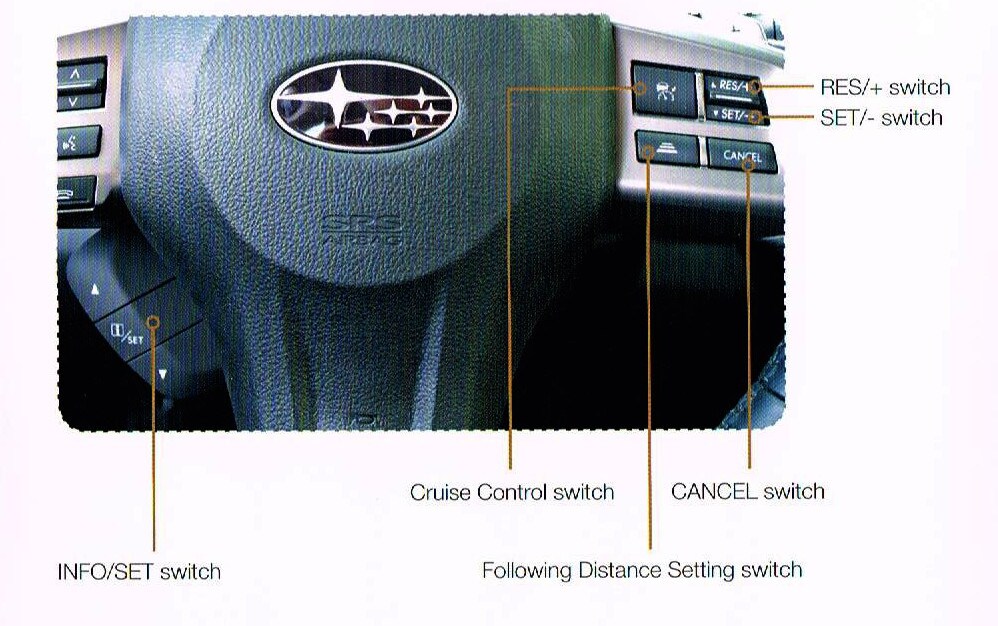
INFO/SET switch
Use the arrows above and below to set or view information on various functions in the multi information display.
Cruise Control switch
Press to resume set speed or to increase set speed while in either Adaptive or Conventional Cruise Control.
RES/+ switch
Press to resume set speed or to increase set speed while in either Adaptive or Conventional Cruise Control.
SET/- switch
Press to set the current speed or to reduce set speed while in either Adaptive or Conventional Cruise Control.
CANCEL switch
Press to cancel the Cruise Control.
Following Distance Setting switch
- Press to change the following distance setting while using Adaptive Cruise Control.
- Press and hold to turn off Adaptive Cruise Control and to switch to Conventional Cruise Control.
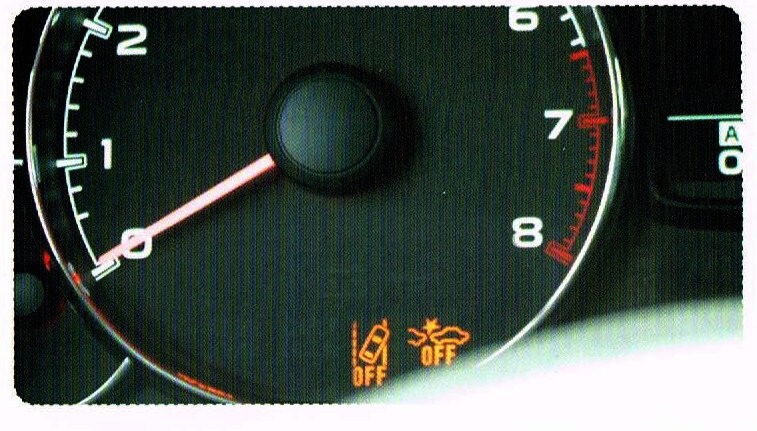
Lane Departure Warning and Pre-Collision Braking System OFF Switches
 Indicator OFF Light
When either or both of these indicator lights is illuminated, the function(s) will not be operable.
Behind the Scenes Video
| |
*EyeSight is a driver assist system that may not operate optimally under all driving conditions. The driver is always responsible for safe and attentive driving. System effectiveness depends on many factors such as vehicle maintenance, tire condition, and weather and road conditions. See the Owner's Manual for complete details on system operation and limitations.